Desktop interfaces in Rust
Build applications for Linux, Windows and macOS with a pure-Rust GUI framework. Widgets, rich text, accessibility, internationalization and persistent settings are included.
cargo add teksilo · Mozilla Public License 2.0 · Linux, Windows and macOS
use teksilo::prelude::*;
use teksilo::widgets::Button;

fn main() {
    let window = WindowConfig::new()
        .title("Hello Teksilo")
        .size(400, 300)
        .root(|tree, _state| {
            let button = Button::new(lit!("Click me"))
                .on_activate_fn(|_ctx| println!("clicked"));
            tree.add(button)
        });

    TeksiloAppBuilder::new()
        .theme(intui::light())
        .initial_window(window)
        .run();
}
Explore the catalog
Choose a family to explore.

Text, icons, images, shapes and validation strips.

Toolbars, status bars, breadcrumbs, banners and wizards.

Action buttons, icon buttons, split buttons and popover triggers.

Checkboxes, radio groups, toggles, sliders and selection controls.

Progress bars, spinners, badges, avatars and links.

Validation, input masks, formatted numbers, search suggestions and input dialogs.

Formatted documents, tables, lists and bidirectional text.

Code editing, plain text and streaming logs with severity colors.

Calendars, date pickers, time pickers and date ranges.

Hex input, compact color editing and an HSV picker.

Menu bars, context menus, submenus and selectable menu items.

Plain and cascading rich tooltips, popovers, dialogs, snackbars and notifications.

Shortcut preferences, privacy controls, language and text scale.

Stacks, grids, wrapping, masonry, form rows and sizing constraints.

Panels, cards, groups, accordions, tabs and scroll areas.

Shared scene views, draggable cards, native controls, vector connectors, selection and zoom.

Resizable, collapsible panels around a central workspace.

Surface, text and editor colors across light and dark themes.

Widget variants, paint recipes and custom style protocols.

Bar, line, pie and donut charts.

Lists, trees, grids, tables and tree tables backed by typed models.

File and text payloads, accepted and rejected drops, and target feedback.

English, French and Arabic, with localized numbers, currencies, dates and right-to-left layout.

Fade, slide, scale and other animated widget wrappers.
Core features
A retained widget tree, reactive state and GPU rendering.
Widgets and layouts
Around 100 widgets and 28 layout primitives, including tables, docking, charts and a scene canvas.
Accessibility
Widgets declare accessible roles and labels. AccessKit connects each window to the platform accessibility API.
Internationalization
Fluent translations are checked at compile time. Includes right-to-left layout and ICU4X number and date formatting.
Reactive state
Signal<T> bindings trigger repaint or layout as needed. UI code runs on the main thread.
GPU rendering
Text and graphics use wgpu. The renderer submits no frames while the application is idle.
Rich text
Shared document and typesetting engines support editing, shaping, bidirectional text and color emoji.
Included in the framework
Tools for building, inspecting and testing desktop applications.
- Data views. Typed list and tree models, sorting, filtering, shared selection, drag reordering and tri-state checkboxes.
- Themes. Int UI light and dark, with optional Material 3, Fluent and macOS Aqua presets. Customize colors, variants and widget styling.
- Input and motion. Rebindable keyboard shortcuts, rich tooltips and composable animations with reduced-motion support.
- Settings. Typed persistent state, migrations, atomic writes and restored window geometry.
- Async (optional). Async UI handlers and background work, with Tokio and async-std adapters.
- Drag and drop. Typed payloads, drop indicators and edge auto-scroll, with cross-application import and export.
- Charts and scenes. Bar, line and pie charts, plus a pannable, zoomable canvas combining widgets and scene items.
- Developer tools. A debug inspector, live widget previewer and runnable examples.
- AI context and automation. Versioned API lookup, documentation search and agent instructions. A debug-only MCP bridge inspects and drives running applications.
- Testing. Headless widget tests without a window or GPU, with a simulated clock for time-dependent behavior.
License and contributions
Teksilo is free software under the Mozilla Public License 2.0.
- Commercial use. Application code can use its own license. Distributed modifications to Teksilo files remain under MPL-2.0; distributors must provide access to the covered source.
- Contributions. Commits require a DCO sign-off. There is no contributor license agreement.
- Trademark. Distributed forks need distinct branding, subject to the packaging exceptions in the trademark policy.
Built with Teksilo
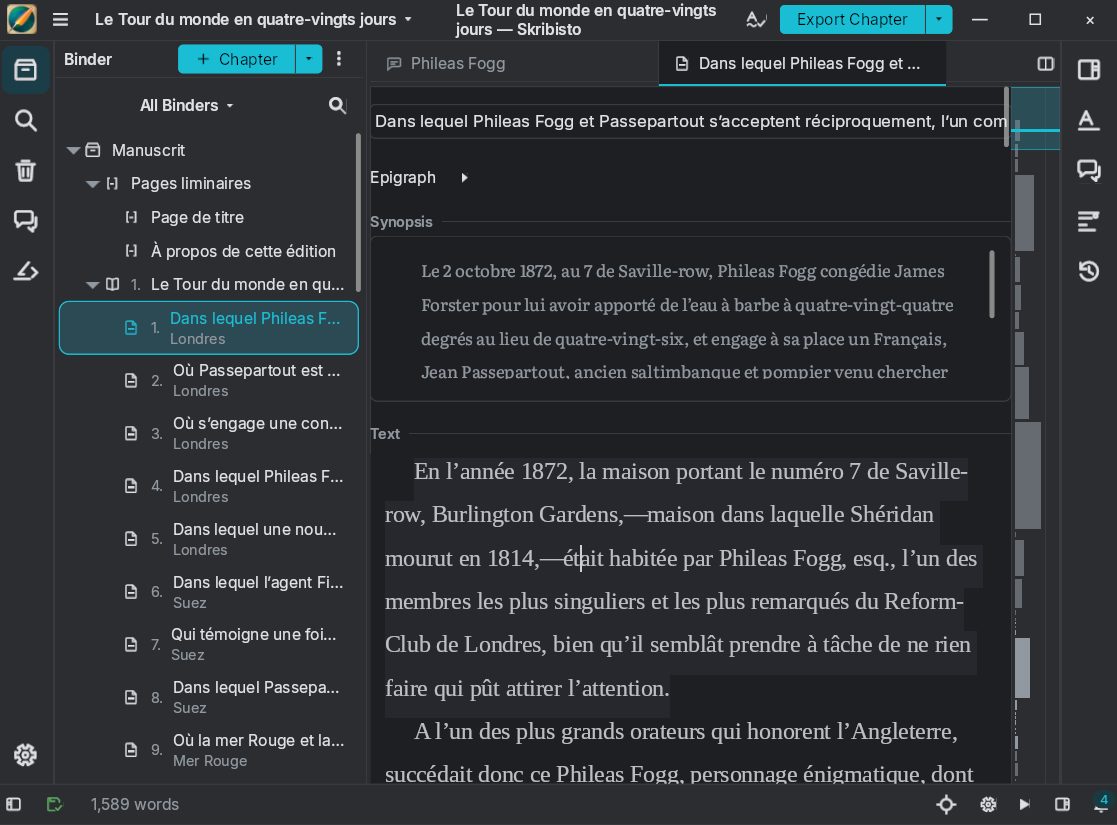
Skribisto 3 uses Teksilo for its document editor, binder, docking layout and accessibility tree.
Pre-1.0
Minor releases may introduce breaking changes. Pin the version you test against. Roadmap priorities follow FernTech’s applications.
Architecture
Teksilo uses a retained widget tree. Widget::layout_response negotiates sizes; build, paint and accessibility define composition, rendering and semantics. Signal<T> bindings update existing widgets, preserving interaction state.
Text uses two independent MPL-2.0 libraries: text-document and text-typeset.
Architecture and final review are human-led; code generation and routine refactoring are LLM-assisted. See the tour for platform coverage and known limitations.